
Last updated: July 2026 | Reading time: 9 min | Author: Jayateerth Kulkarni, Founder — ETMark Academy & Sugar Salt Media
If you have ever set up tracking for a website, you have run into the Google Tag Manager vs Analytics question — usually while staring at two Google products that look like they do the same thing. They do not. And confusing the two is one of the most common reasons marketers end up with duplicate events, missing conversions, and reports they cannot trust.
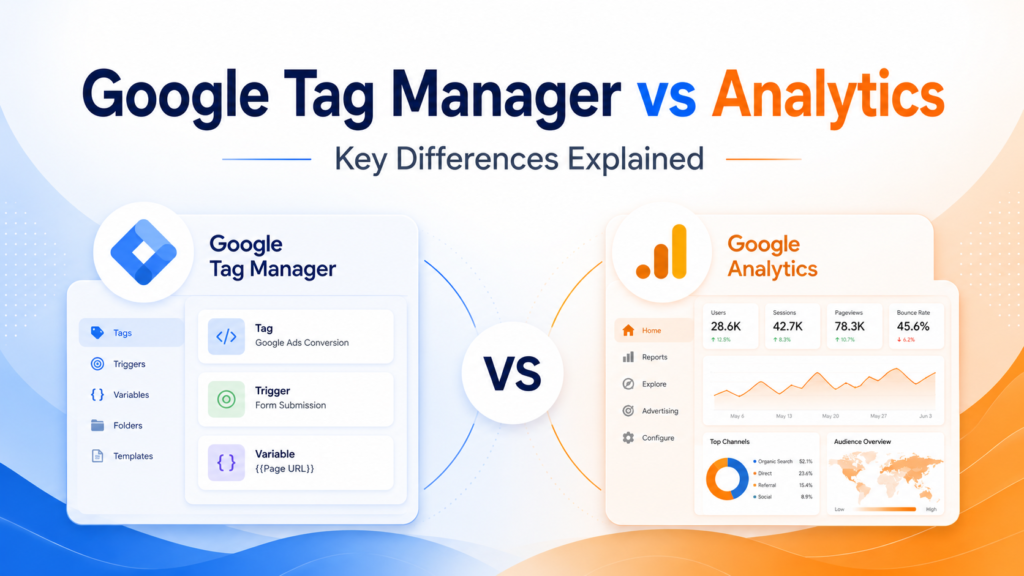
Here is the short answer. Google Tag Manager (GTM) is a tag-management system that deploys and controls the tracking codes on your website. Google Analytics (now GA4) is the reporting platform that receives that data and turns it into insights. In plain terms: GTM sends the data, GA4 makes sense of it — and most marketers use both together, not one instead of the other. That is the real difference between Google Tag Manager and Google Analytics, and the rest of this guide unpacks it with examples, a comparison table, and a clear recommendation.
Quick answer: Google Tag Manager vs Analytics at a glance
- Google Tag Manager = the control panel that installs and manages tracking tags (Google Analytics, Google Ads, Meta Pixel, and more) without editing your site code.
- Google Analytics (GA4) = the destination that collects, stores, and reports user behaviour — sessions, events, traffic sources, and conversions.
- They are partners, not rivals. The most common professional setup is to use GTM to deploy the GA4 tag onto your website.
- Both are free for standard use, which is why nearly every small business and agency in India relies on them.
What is Google Tag Manager?
Google Tag Manager is a free tool that lets you add, edit, and manage tracking codes — called tags — through a simple web interface instead of hard-coding them into your website. According to Google’s official Tag Manager page, it supports and integrates with all Google and third-party tags, with error checking and fast tag loading built in.
Think of GTM as the delivery system for your marketing data. You install one small container snippet on your site, and from then on you can add or change tracking without waiting on a developer. GTM is built around four core pieces:
- Tags — the snippets that send data somewhere (for example, the GA4 tag, a Google Ads conversion tag, or the Meta Pixel).
- Triggers — the rules that decide when a tag fires (a page view, a button click, a form submission, a scroll).
- Variables — the reusable values a tag or trigger uses (page URL, click text, transaction value).
- Preview & debug mode — a testing sandbox so you can check a tag before publishing it live, with version control if you need to roll back.
The headline benefit: your marketing team can move fast and stop depending on developers for every tracking change. If you want the wider picture of where GTM sits among the essentials, see our guide to the top digital marketing tools for beginners.
What is Google Analytics (GA4)?
Google Analytics is Google’s analytics and reporting platform. It collects data about how people find and use your website or app, then presents it as reports on users, sessions, traffic sources, engagement, and conversions. The current version is Google Analytics 4 (GA4).
This matters because GA4 is not just a facelift of the old tool. As Google confirms on its official Analytics support page, standard Universal Analytics properties stopped processing new data on July 1, 2023. GA4 replaced it, and it works differently in one crucial way:
- Universal Analytics was session-based — it grouped activity into visits.
- GA4 is event-based — every interaction (a page view, a click, a video play, a purchase) is captured as its own event, across both web and app.
So GA4 is the warehouse and the dashboard. It receives the data, stores it, and answers the questions marketers actually care about: Where did my visitors come from? Which pages hold attention? How many people converted, and from which campaign? If you are new to the field, our complete beginner’s guide to digital marketing puts analytics in the bigger context.
The difference between Google Tag Manager and Google Analytics
Here is the cleanest way to hold the difference between Google Tag Manager and Google Analytics in your head:
Google Tag Manager collects and sends the data. Google Analytics receives and reports it.
An analogy that sticks with our students: GTM is the delivery truck, and GA4 is the warehouse. The truck decides what gets picked up and where it is dropped off. The warehouse stores everything and lets you audit exactly what came in. A truck with no warehouse has nowhere to deliver; a warehouse with no truck sits empty. Neither is a substitute for the other.
Two more distinctions worth remembering:
- GTM is not analytics. It does not calculate bounce rate, sessions, or conversion rate. It only manages which tracking codes fire and when.
- GA4 is not a tag manager. It can receive events, but it does not give you a governed, developer-free way to deploy and control tags across your whole marketing stack.
Google Tag Manager vs Analytics: side-by-side comparison
| Aspect | Google Tag Manager (GTM) | Google Analytics 4 (GA4) |
|---|---|---|
| Primary job | Deploy & manage tracking codes | Collect & report data |
| Category of tool | Tag management system | Analytics / reporting platform |
| What it produces | Tags firing on the right triggers | Reports, insights, conversions |
| Does it store data? | No — it routes data onward | Yes — it stores and analyses it |
| Works with | Google & many third-party tags (Meta, LinkedIn, etc.) | Mainly the Google ecosystem (Ads, BigQuery) |
| Data model | Not applicable (delivery only) | Event-based |
| Setup skill needed | Understand tags, triggers, variables | Guided setup, more beginner-friendly |
| Cost | Free | Free (standard) |
| Can it work alone? | Needs a destination like GA4 | Yes, but harder to manage without GTM |
How Google Tag Manager and Google Analytics work together
In a real project, you rarely choose one over the other. You use them as a pipeline. Here is the typical workflow we teach and use on live client accounts:
- Install the GTM container — one snippet goes on every page of your site.
- Create your GA4 property — this is the destination that will hold your data.
- Add the GA4 configuration tag inside GTM — instead of pasting the GA4 code directly into your site, you deploy it through Tag Manager.
- Set triggers — decide which actions to track: form submits, button clicks, purchases, WhatsApp clicks.
- Preview, debug, and publish — verify the tags fire correctly, then push them live.
- Read the reports in GA4 — the events flow in, and now you can measure what is working.
This is exactly how modern conversion tracking in digital marketing is built — GTM captures the action, GA4 (and Google Ads) reports the result. It is also the backbone of every serious performance marketing campaign, where every rupee is judged against a measurable outcome. If you run local campaigns, the same setup powers proper measurement in our guide to Google Ads for local business.
Do you need both? Which one should you use?
For almost everyone, the answer is both. But it depends on where you are:
- Just want basic reports (page views, traffic, top pages)? You can install GA4 on its own. It will do the job for a simple site.
- Want to track clicks, forms, purchases, and multiple platforms (Google Ads + Meta + LinkedIn)? Add GTM. Managing all those tags without a tag manager becomes messy and error-prone fast.
- Running an agency, e-commerce store, or lead-gen business? Use both, as a pipeline. GTM for control, GA4 for insight.
The one thing you should not do is treat them as competitors and pick only one because you think the other is redundant. That misunderstanding is what creates broken tracking.
Common mistakes we see (and how to avoid them)
After training hundreds of students and auditing real client accounts, these are the mistakes that come up again and again:
- Installing GA4 twice — once directly in the site code and again through GTM. Result: doubled pageviews and inflated numbers. Pick one method; the GTM route is cleaner.
- Firing tags on the wrong trigger — a conversion tag set to fire on every page instead of the thank-you page. Result: fake conversions.
- Skipping preview mode — publishing tags without testing them. Always debug before you go live.
- Ignoring consent and privacy — as cookie and privacy rules tighten, tags should respect user consent. GTM is where you manage that logic.
Learning to spot these is exactly why we insist students build and break a real website. As we argue in why every digital marketing student should build a website, you only truly understand GTM and GA4 when you wire them up on a live project yourself.
Frequently asked questions
Is Google Tag Manager the same as Google Analytics?
No. Google Tag Manager is a tag-management system that deploys and controls tracking codes on your site, while Google Analytics (GA4) is the platform that receives that data and reports on user behaviour. GTM sends the data; GA4 analyses it. They are used together, not as alternatives.
Do I need Google Tag Manager if I already have Google Analytics?
Not always. If you only need basic reports, GA4 alone is enough. But once you want to track clicks, forms, purchases, or run multiple platforms like Google Ads and Meta, GTM makes managing all those tags far easier and less error-prone. Most growing businesses eventually use both.
Is Google Tag Manager free?
Yes. Both Google Tag Manager and the standard version of Google Analytics 4 are free for the vast majority of websites and businesses. There are paid enterprise tiers (Tag Manager 360 and Analytics 360), but small businesses and agencies almost never need them.
Can Google Tag Manager work without Google Analytics?
Yes, but it needs a destination. GTM only manages and sends tags — it does not store or report data itself. You can point it to GA4, Google Ads, Meta Pixel, or other tools. Without at least one destination to receive the data, GTM has nowhere to deliver it.
What replaced Universal Analytics?
Google Analytics 4 (GA4) replaced Universal Analytics. Standard Universal Analytics properties stopped processing new data on July 1, 2023. GA4 uses an event-based data model instead of the older session-based one, and it tracks across both websites and apps.
Should a beginner learn GTM or GA4 first?
Start with GA4 to understand what the data means, then learn GTM to control how that data is collected. In practice they reinforce each other, so the best approach is to set up a real website and configure both together — which is how job-ready marketers actually learn them.
Conclusion: it was never GTM vs GA4
The Google Tag Manager vs Analytics debate is settled the moment you understand their roles. Google Tag Manager is the control panel that decides what data to collect and where to send it. Google Analytics 4 is the engine that receives that data and tells you what is happening and why. One collects, the other reports. Used together, they give you clean, trustworthy tracking that you can actually make decisions on.
If you want to learn this hands-on — building tags, triggers, and GA4 reports on real projects instead of memorising definitions — that is exactly how we train marketers at ETMark. Explore our Digital Marketing Course in Mysore with live projects, or browse all our programs on the ETMark Academy courses page.
About the author: Jayateerth Kulkarni is the Founder of ETMark Academy and Sugar Salt Media, a full-service digital marketing and AI agency based in Mysuru. He trains students and business owners on practical, tool-first digital marketing and works on live client accounts across real estate, healthcare, education, and e-commerce.