
Last updated: July 2026 | Reading time: 9 min | Author: Jayateerth Kulkarni, Founder — ETMark Academy & Sugar Salt Media
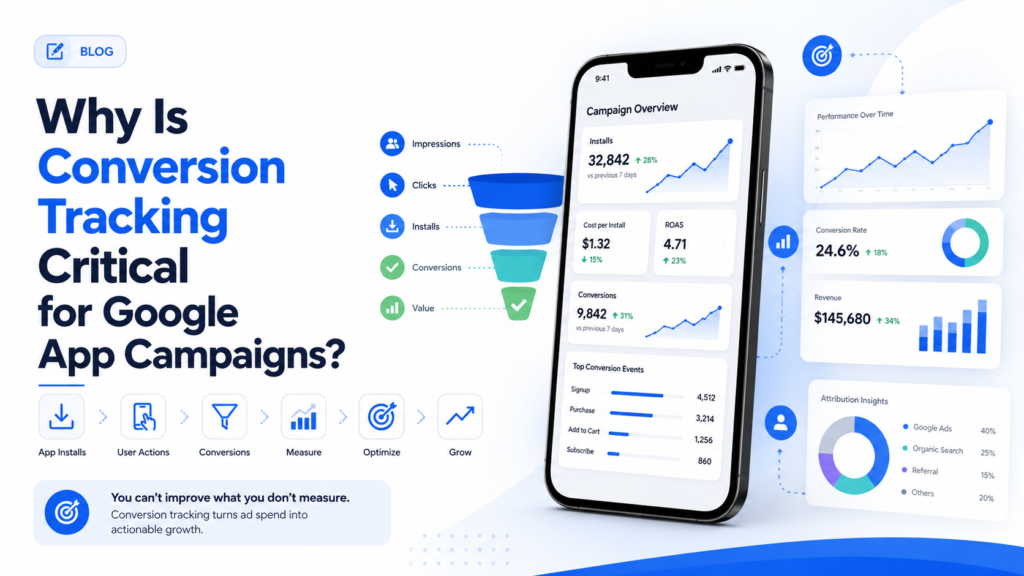
Why is conversion tracking critical for Google App Campaigns? Because App Campaigns run almost entirely on machine learning, and machine learning has nothing to learn from without conversion data. Google’s algorithm decides which networks to show your ad on, which creative combination to test next, and which users are worth a higher bid — using only the conversion signals you feed it. Turn that feed off, or set it up badly, and you are not running an intelligent campaign anymore. You are simply paying for exposure and hoping.
This guide breaks down exactly what conversion tracking measures in an App Campaign, why Smart Bidding cannot function without it, the attribution change Google rolled out in 2026 that every app marketer should know about, and how to set tracking up correctly from day one.
Quick answer: why conversion tracking matters for App Campaigns
- App Campaigns are 100% automated. You do not pick placements, audiences, or creative combinations — Google’s machine learning does, based entirely on conversion signals.
- No conversion data means no optimization. Without it, Google can only optimize toward clicks or impressions, which tells you nothing about business value.
- It is the only way to separate installs from customers. An install is a download. A conversion — a purchase, a subscription, a completed sign-up — is proof that download turned into value.
- Google’s 2026 attribution update raised the stakes. Conversions are now timestamped to the install date rather than the ad-click date, which changes how fast your Smart Bidding data actually becomes useful.
What conversion tracking actually measures in an App Campaign
App Campaign conversion tracking goes far beyond counting downloads. The measurable actions typically fall into four groups:
- App installs and first opens — the baseline signal confirming someone downloaded and opened your app after seeing the ad.
- In-app purchases and revenue events — the actions that show a download turned into paying, engaged use.
- Registrations and sign-ups — intent signals for apps where the business model depends on account creation before monetization.
- Custom in-app events — level completions, feature activations, or subscription starts, tracked through Firebase or a third-party mobile measurement partner.
Google’s own mobile app conversion tracking documentation confirms that installs and first-opens are captured by default through Firebase or most third-party app analytics providers, while custom in-app actions require adding the relevant event code yourself. The wider the range of events you track, the more material Google’s machine learning has to work with.
Why Google App Campaigns can’t optimize without conversion data
Unlike a Search or Display campaign, an App Campaign gives you almost no manual controls. You do not choose keywords. You do not pick individual placements across Search, Display, YouTube, Play, or Discover. You submit creative assets, set a budget and a bidding goal, and Google’s machine learning handles everything else — testing combinations in real time and shifting spend toward what is working.
That entire system runs on a single input: conversions. Remove the data feed, or track only installs while ignoring what happens after, and the algorithm has nothing but download counts to optimize toward. It will happily keep buying cheap installs from users who never open the app again, because from where it sits, an install is the only signal of success it has been given. This is precisely the mechanism that makes accurate performance marketing possible — every rupee of spend is meant to be judged against a real, measurable outcome, not a vanity metric.
Smart Bidding strategies inside App Campaigns — Target CPA, Target ROAS, and Maximize Conversions — depend on this feedback loop being both accurate and fast. The algorithm makes a bidding decision, observes whether that decision led to a valuable conversion, and adjusts. Break the feedback loop and every downstream decision the algorithm makes is based on incomplete or misleading information.
The 2026 attribution shift: why timing now matters even more
In February 2026, Google made a structural change to how it attributes app conversions, and it is worth understanding if you manage App Campaigns. Previously, when a user clicked an app install ad, any resulting conversion — the install itself, or a purchase weeks later — was logged against the original click date. If someone clicked an ad on the 1st but did not install until the 15th, the conversion was still recorded against the 1st.
Google has now moved to attributing conversions to the date they actually happen — the install date, and the date of each post-install event — rather than backdating everything to the click. This aligns Google Ads with how mobile measurement partners such as AppsFlyer, Adjust, and Branch have always reported data, and it closes a long-standing gap that made Google Ads and MMP dashboards show different numbers for the same campaign.
The practical impact for conversion tracking is significant. Smart Bidding algorithms learn through a feedback loop: make a decision, observe the outcome, adjust. When conversions were backdated by days or weeks under the old 30-day default attribution window, the algorithm was reacting to signals that were already stale. Under install-date attribution, campaigns can exit the learning phase faster and Target ROAS bidding becomes noticeably more responsive, because the data arriving today actually reflects decisions made recently — not weeks ago.
| Attribution model | Conversion timestamp | Effect on Smart Bidding |
|---|---|---|
| Old model (pre-2026) | Backdated to the ad click | Delayed, stale feedback loop — slower learning phase |
| Current model (2026 onward) | Logged on the actual install/event date | Faster, more accurate feedback loop — quicker optimization |
No action is required on your end to benefit from this — it is a backend change to how Google timestamps data, not something you configure. But it is a good moment to revisit your attribution window settings and confirm your conversion actions are still mapped correctly, especially if you compare Google Ads numbers against an MMP dashboard, as Search Engine Land’s report on the change first noted when it began rolling out.
How to set up conversion tracking for a Google App Campaign
Setting this up correctly, before you launch or scale spend, is what separates campaigns that self-optimize from campaigns that quietly burn budget. Google’s own conversion tracking setup guide lays out the core paths, which typically come down to three options:
- Google Analytics 4 for Firebase — the most common route. GA4 combines analytics and Firebase into one property, tracking installs, in-app events, and revenue, then feeding those events straight into Google Ads as conversions.
- A third-party mobile measurement partner — tools like AppsFlyer, Adjust, or Branch add cross-platform attribution, fraud filtering, and deep linking on top of what Firebase covers, which matters once you are running app ads across Google, Meta, and TikTok simultaneously.
- Google Play’s install referrer and native reporting — a baseline layer that captures installs even before any SDK is integrated, though it will not give you in-app event detail on its own.
Once a tracking source is connected, link it inside your Google Ads conversion actions and decide which events actually count as a conversion — this is the step teams skip most often, defaulting to “track the install and stop there.” Google explicitly recommends tracking more than just your primary goal, because events that lead up to a purchase — a tutorial completed, a product viewed, a cart started — give the machine learning model far more patterns to recognize a valuable user by.
If your app also runs a pre-registration or landing page campaign to build a waitlist before launch, that web-side tracking layer matters just as much. It is worth understanding how Google Tag Manager and Google Analytics work together before you touch app tracking at all, since the same cause-and-effect logic — one tool deploys the tag, the other reports on it — carries over. If that landing page runs on WordPress, our walkthrough on adding Google Tag Manager code in WordPress covers the exact setup.
Cost per install vs. cost per action: what the data actually reveals
One of the clearest reasons conversion tracking is non-negotiable is what it exposes about return on ad spend. Cost per install (CPI) tells you what you paid to get a download. It says nothing about whether that download was worth acquiring.
Cost per action (CPA) — cost per purchase, per registration, per subscription start — tells you what you paid for something with actual business value. A campaign can show an excellent CPI while quietly delivering a terrible CPA, because it is filling your install numbers with users who churn immediately. Without conversion tracking connected all the way through to revenue or key in-app events, you cannot see that gap. You just see a healthy-looking install count and an empty bank account at the end of the month.
This is the same discipline behind conversion tracking in digital marketing more broadly — the principle does not change from web to app, only the tools used to capture it. Every channel needs a way to connect ad spend to a real outcome, or budget decisions are being made on guesswork.
Common mistakes that quietly break App Campaign tracking
- Tracking installs only. The single most common mistake. It gives Smart Bidding one weak signal to chase instead of a fuller picture of value.
- Leaving the default attribution window unexamined. A window that does not match how long your users typically take to convert will either miss real conversions or credit ones that were not driven by the ad.
- Running Firebase and a third-party MMP without reconciling them. Minor discrepancies are normal; large, unexplained ones usually mean a duplicate or missing event somewhere in the setup.
- Ignoring iOS measurement limits. Apple’s App Tracking Transparency framework means a meaningful share of iOS conversions are modeled rather than directly observed — feed the model as much accurate first-party data as possible to keep those estimates reliable.
- Changing conversion settings mid-flight. Every change to what counts as a conversion resets part of what the algorithm has learned, so treat your conversion action setup as something to get right before scaling spend, not something to tweak weekly.
Frequently asked questions
Why is conversion tracking critical for Google App Campaigns?
Because App Campaigns are fully automated — Google’s machine learning chooses targeting, placements, and creative combinations using only the conversion data you provide. Without accurate conversion tracking, the algorithm has nothing but install counts to optimize toward, which means it cannot tell a genuinely valuable user from someone who deletes the app immediately.
What can you track as a conversion in a Google App Campaign?
App installs and first opens, in-app purchases and revenue events, account registrations, and custom events such as level completions or subscription starts. These are typically captured through Google Analytics 4 for Firebase or a third-party mobile measurement partner like AppsFlyer, Adjust, or Branch.
What changed in Google’s app conversion attribution in 2026?
Google shifted from attributing app conversions to the original ad-click date to attributing them on the actual install or event date. This aligns Google Ads with how mobile measurement partners have always reported data and gives Smart Bidding more timely, accurate signals to optimize with.
Do I need a third-party tool like AppsFlyer if I already use Firebase?
Not always. Firebase alone is enough for many single-platform apps that only advertise through Google. A third-party MMP becomes valuable once you run app campaigns across multiple ad platforms, since it adds cross-platform attribution, fraud filtering, and deep linking that Firebase does not provide on its own.
What is the difference between cost per install and cost per action?
Cost per install (CPI) measures what you paid for a download and says nothing about the user’s value. Cost per action (CPA) measures what you paid for a meaningful outcome — a purchase, a sign-up, a subscription — and is only visible when conversion tracking extends beyond the install itself.
How long does an App Campaign need conversion data before it optimizes well?
Most App Campaigns need a steady flow of conversions over one to two weeks before Smart Bidding stabilizes, though this varies by budget and conversion volume. Tracking a wider range of in-app events from launch — not just the primary goal — tends to shorten this learning period.
Conclusion: conversion tracking is the steering wheel, not an add-on
App Campaigns hand almost every decision to Google’s machine learning, which makes conversion tracking the one lever advertisers still control directly. Get it right — track meaningful events, choose a sensible attribution window, and take advantage of the more accurate 2026 install-date attribution — and the algorithm optimizes toward customers who actually matter to your business. Get it wrong, and you are simply funding installs with no way of knowing which ones were worth acquiring.
If you want to learn how to set this up properly — Firebase, GA4, Google Ads conversion actions, and reading the results like a marketer rather than guessing — that is exactly the kind of hands-on skill we build into our Digital Marketing Course in Mysore with live projects. Browse all our programs on the ETMark Academy courses page.
About the author: Jayateerth Kulkarni is the Founder of ETMark Academy and Sugar Salt Media, a full-service digital marketing and AI agency based in Mysuru. He works hands-on with paid media, analytics, and app campaign tracking for clients across real estate, healthcare, education, and e-commerce, and trains students and business owners on practical, tool-first digital marketing.
{
“@context”: “https://schema.org”,
“@graph”: [
{
“@type”: “BlogPosting”,
“mainEntityOfPage”: {
“@type”: “WebPage”,
“@id”: “https://etmarkacademy.com/why-conversion-tracking-critical-google-app-campaigns/”
},
“headline”: “Why Is Conversion Tracking Critical for Google App Campaigns? (2026 Guide)”,
“description”: “Why is conversion tracking critical for Google App Campaigns? See how it powers Smart Bidding, the 2026 install-date attribution shift, and real cost-per-action reporting.”,
“author”: {
“@type”: “Person”,
“name”: “Jayateerth Kulkarni”,
“url”: “https://etmarkacademy.com/about-us/”
},
“publisher”: {
“@type”: “Organization”,
“name”: “ETMark Academy”,
“url”: “https://etmarkacademy.com/”
},
“datePublished”: “2026-07-27T13:00:00+05:30”,
“dateModified”: “2026-07-27T13:00:00+05:30”
},
{
“@type”: “FAQPage”,
“mainEntity”: [
{
“@type”: “Question”,
“name”: “Why is conversion tracking critical for Google App Campaigns?”,
“acceptedAnswer”: {
“@type”: “Answer”,
“text”: “Because App Campaigns are fully automated – Google’s machine learning chooses targeting, placements, and creative combinations using only the conversion data you provide. Without accurate conversion tracking, the algorithm has nothing but install counts to optimize toward, which means it cannot tell a genuinely valuable user from someone who deletes the app immediately.”
}
},
{
“@type”: “Question”,
“name”: “What can you track as a conversion in a Google App Campaign?”,
“acceptedAnswer”: {
“@type”: “Answer”,
“text”: “App installs and first opens, in-app purchases and revenue events, account registrations, and custom events such as level completions or subscription starts. These are typically captured through Google Analytics 4 for Firebase or a third-party mobile measurement partner like AppsFlyer, Adjust, or Branch.”
}
},
{
“@type”: “Question”,
“name”: “What changed in Google’s app conversion attribution in 2026?”,
“acceptedAnswer”: {
“@type”: “Answer”,
“text”: “Google shifted from attributing app conversions to the original ad-click date to attributing them on the actual install or event date. This aligns Google Ads with how mobile measurement partners have always reported data and gives Smart Bidding more timely, accurate signals to optimize with.”
}
},
{
“@type”: “Question”,
“name”: “Do I need a third-party tool like AppsFlyer if I already use Firebase?”,
“acceptedAnswer”: {
“@type”: “Answer”,
“text”: “Not always. Firebase alone is enough for many single-platform apps that only advertise through Google. A third-party MMP becomes valuable once you run app campaigns across multiple ad platforms, since it adds cross-platform attribution, fraud filtering, and deep linking that Firebase does not provide on its own.”
}
},
{
“@type”: “Question”,
“name”: “What is the difference between cost per install and cost per action?”,
“acceptedAnswer”: {
“@type”: “Answer”,
“text”: “Cost per install (CPI) measures what you paid for a download and says nothing about the user’s value. Cost per action (CPA) measures what you paid for a meaningful outcome – a purchase, a sign-up, a subscription – and is only visible when conversion tracking extends beyond the install itself.”
}
},
{
“@type”: “Question”,
“name”: “How long does an App Campaign need conversion data before it optimizes well?”,
“acceptedAnswer”: {
“@type”: “Answer”,
“text”: “Most App Campaigns need a steady flow of conversions over one to two weeks before Smart Bidding stabilizes, though this varies by budget and conversion volume. Tracking a wider range of in-app events from launch – not just the primary goal – tends to shorten this learning period.”
}
}
]
}
]
}